Lumière Marketplace is a premium e-commerce platform that showcases modern web development practices while delivering an exceptional user experience. Built with Next.js 14 and TypeScript, this project demonstrates how to create a production-ready online store with advanced features like real-time cart management, email notifications, and stunning visual effects.
For Non-Technical Readers: Think of this as creating a beautiful, fast, and user-friendly online store like Amazon or eBay, but with a focus on premium products and elegant design.
For Technical Readers: This is a full-stack e-commerce application leveraging modern React patterns, server-side rendering, and advanced state management with Context API.
Live Demo
✨ Core Features
For Shoppers:
- Product Browsing - Explore curated premium products
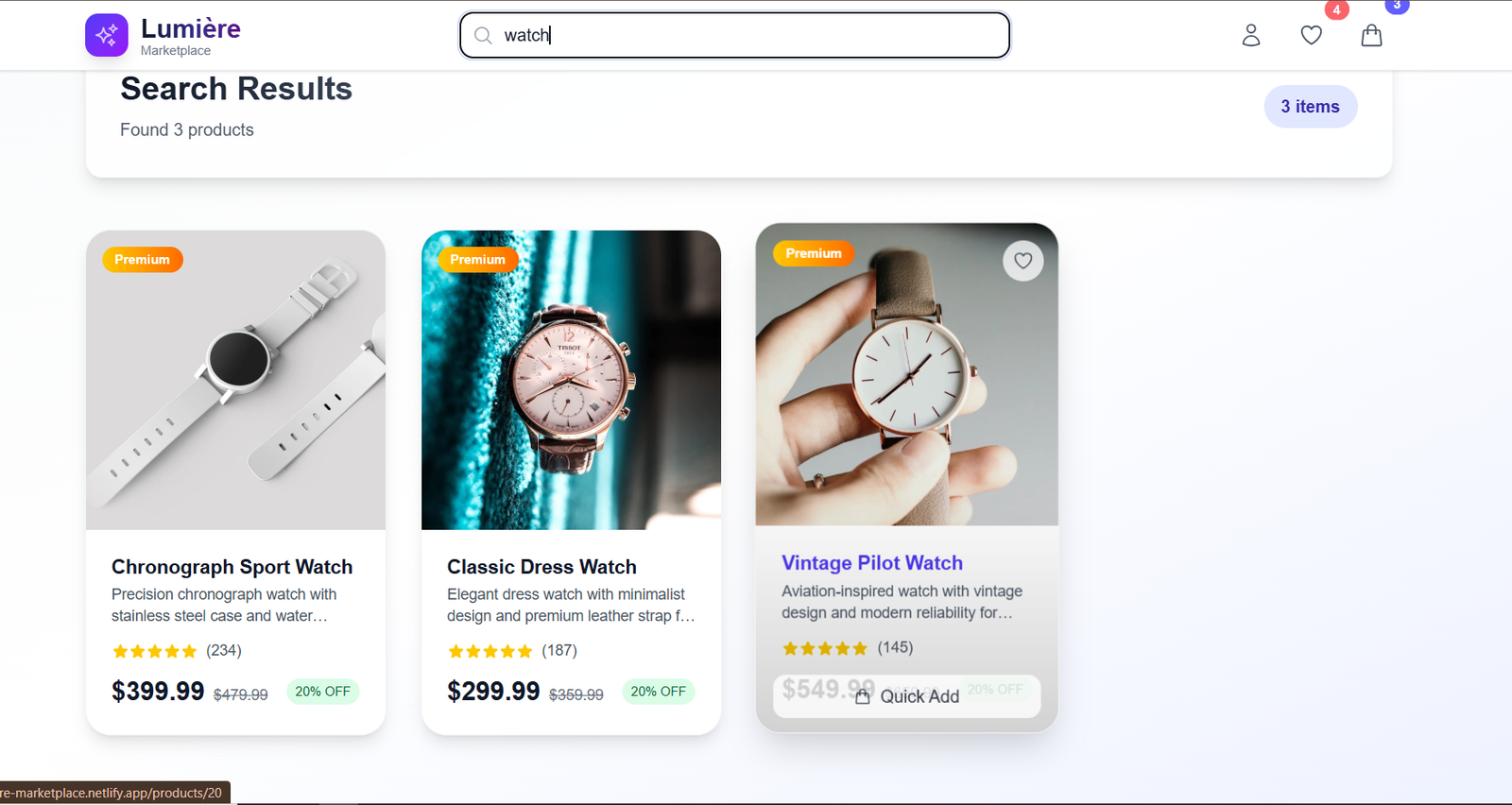
- Smart Search - Find products instantly with real-time filtering
- Wishlist System - Save favorite items for later
- Shopping Cart - Add, remove, and manage items seamlessly
- Secure Checkout - Complete purchase flow with multiple delivery options
- Order Confirmation - Receive detailed invoices via email
For Developers:
- TypeScript Integration - Full type safety throughout the application
- Server-Side Rendering - Optimized performance with Next.js 14
- Context State Management - Centralized cart and Wishlist management
- Email Integration - Automated invoice generation and delivery
- Responsive Design - Mobile-first approach with Tailwind CSS
- Performance Optimization - Image optimization and lazy loading
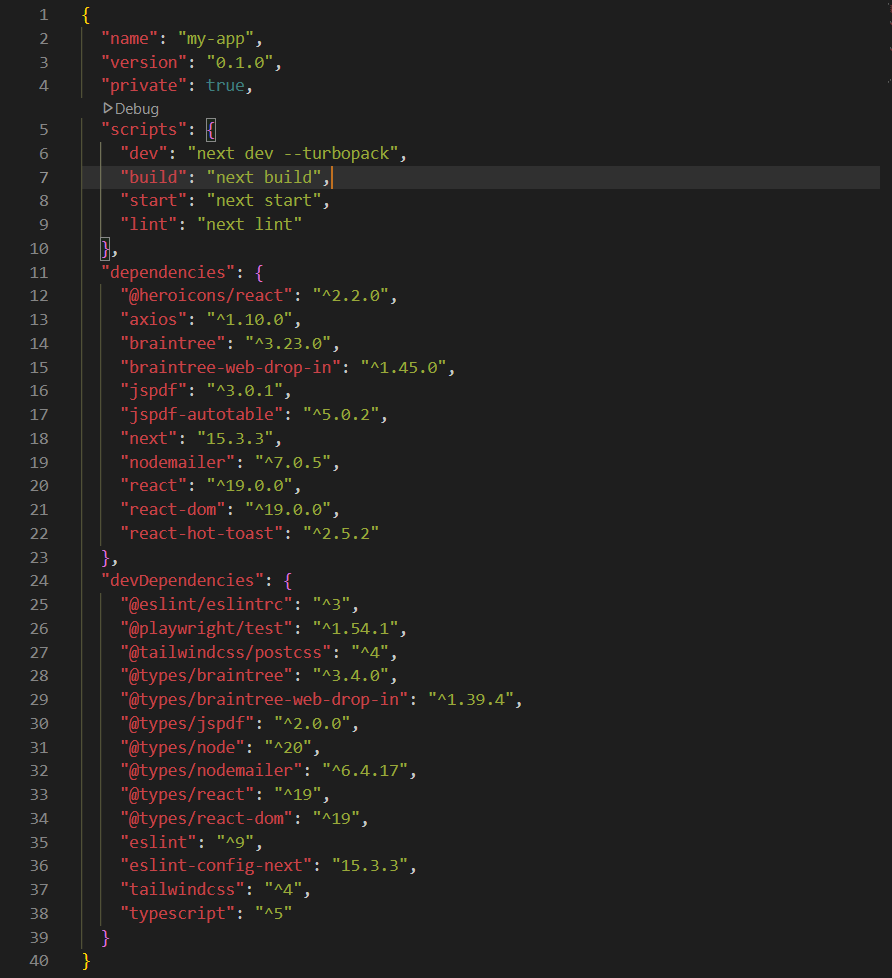
🛠️ Technology Stack
Frontend Technologies
// Modern React with TypeScript
"next": "14.2.13"
"react": "^18"
"typescript": "^5"- Next.js 14 - React framework with App Router
- TypeScript - Type-safe JavaScript for better development experience
- Tailwind CSS - Utility-first CSS framework for rapid styling
- React Context API - State management for cart and wishlist
Backend & Services
// Email and PDF generation
"nodemailer": "^6.9.15"
"jspdf": "^2.5.2"
"html2canvas": "^1.4.1"- Node.js API Routes - Serverless functions for backend logic
- Nodemailer - Email delivery system
- jsPDF - Dynamic PDF invoice generation
- Heroicons - Beautiful SVG icons
Styling & UI
- Custom Animations - CSS transitions and transforms
- Gradient Backgrounds - Modern visual aesthetics
- Glass Morphism - Backdrop blur effects
- Responsive Grid - Adaptive layouts for all devices
🚀 Getting Started
Prerequisites
- Node.js 18+ installed
- npm or yarn package manager
- Basic understanding of React (for developers)
🎯 Key Features Deep Dive
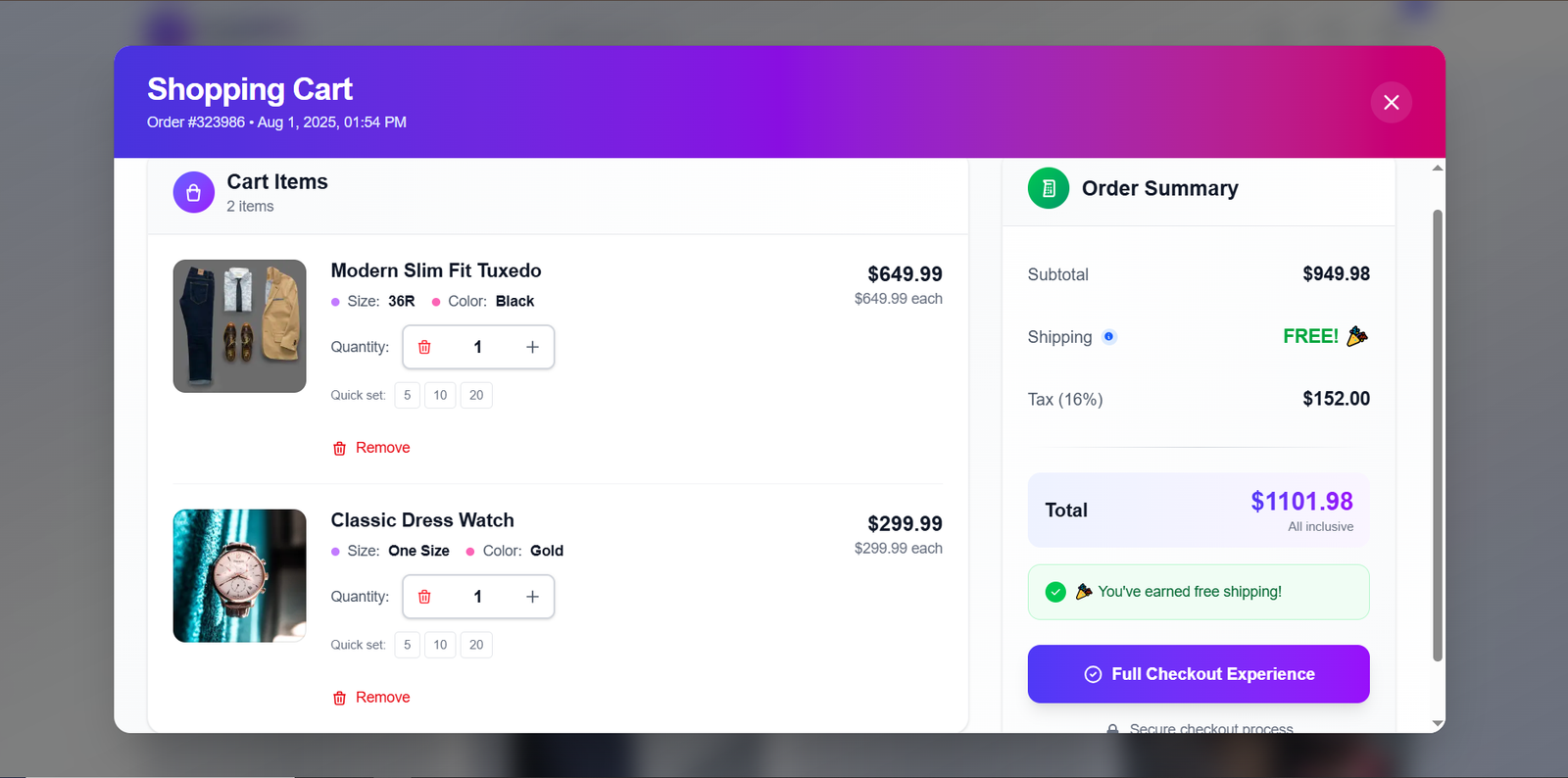
🛒 Shopping Cart System
The shopping cart is the heart of any e-commerce platform. Here's how I implemented a robust cart system:
1// Context-based state management
2interface CartItem {
3 id: string;
4 name: string;
5 price: number;
6 quantity: number;
7 image: string;
8}
9
10const CartContext = createContext<CartContextType | undefined>(undefined);Features:
- Real-time Updates - Cart count updates instantly
- Persistent Storage - Cart survives page refreshes
- Quantity Management - Easy increment/decrement controls
- Price Calculation - Automatic subtotal, tax, and shipping calculation
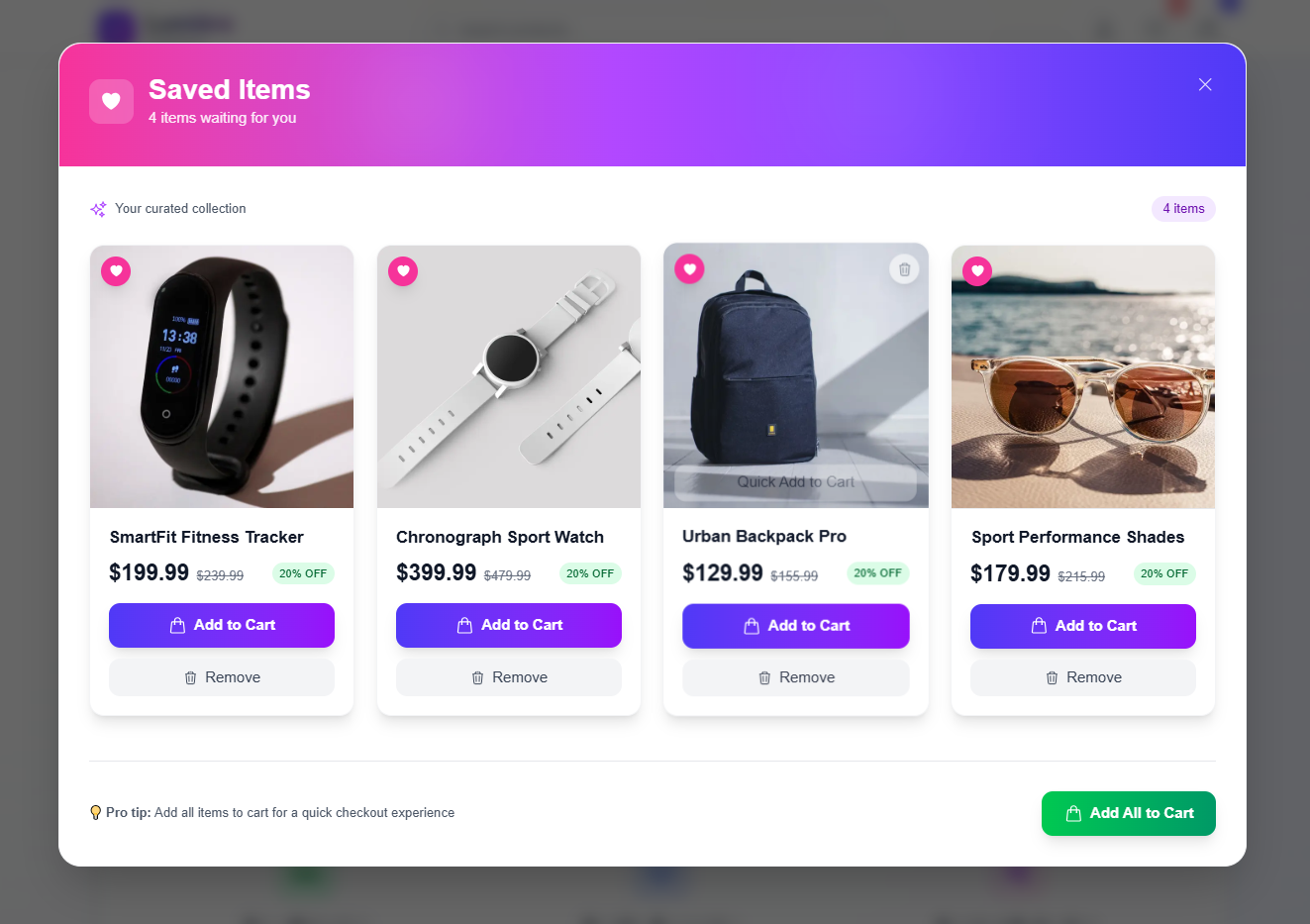
💝 Wishlist Management
Users can save products for later purchase:
// Wishlist functionality
const toggleWishlist = (product: Product) => {
if (wishlistedProducts.has(product.id)) {
removeFromSaved(product);
} else {
addToSaved(product);
}
};User Experience:
- Heart Icon Animation - Visual feedback on save/remove
- State Persistence - Wishlist maintained across sessions
- Easy Access - Quick view from navigation bar
🔍 Smart Search System
Real-time search with instant results:
1// Search implementation
2const handleSearch = useCallback((query: string) => {
3 if (!query.trim()) {
4 setFilteredProducts(products);
5 setIsSearching(false);
6 } else {
7 const filtered = products.filter(product =>
8 product.name.toLowerCase().includes(query.toLowerCase()) ||
9 product.description.toLowerCase().includes(query.toLowerCase())
10 );
11 setFilteredProducts(filtered);
12 setIsSearching(true);
13 }
14}, [products]);Search Features:
- Instant Results - No page refresh needed
- Multiple Fields - Searches name and description
- Visual Feedback - Clear "no results" state
🛍️ Enhanced Product Cards
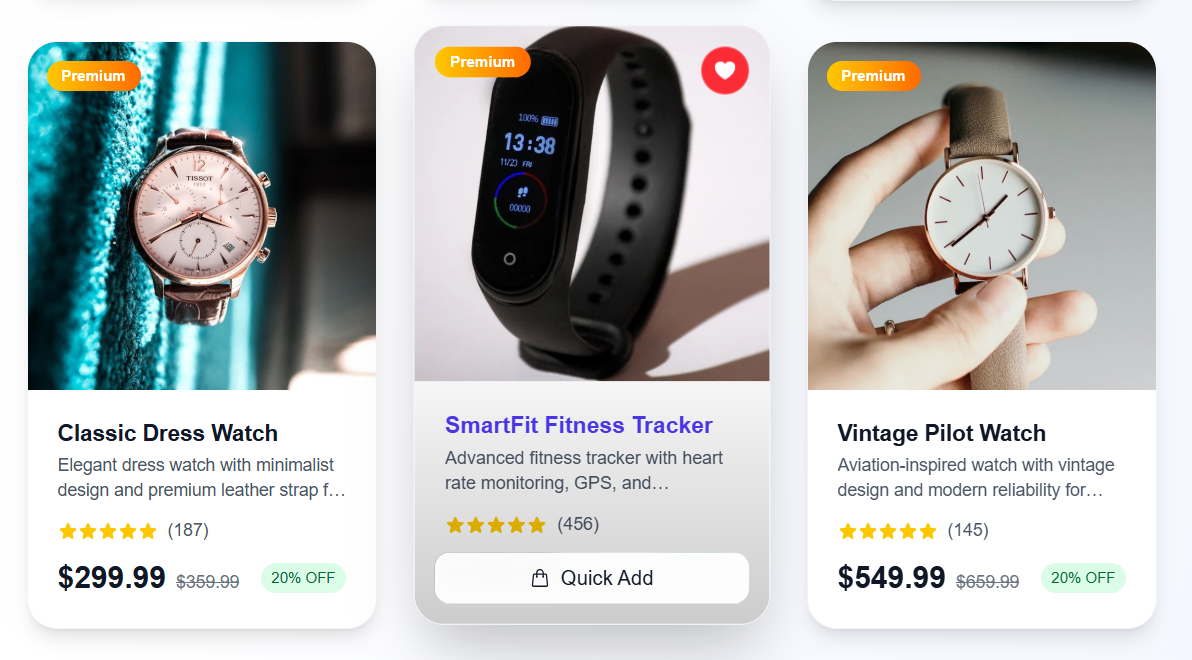
Each product card is designed for maximum engagement:
1// Interactive product card
2<div className="group relative bg-white rounded-3xl shadow-lg hover:shadow-2xl border border-gray-100 overflow-hidden transition-all duration-500 hover:scale-[1.02] hover:-translate-y-2">
3 {/* Product image with optimized loading */}
4 <OptimizedImage product={product} index={index} />
5
6 {/* Interactive overlays */}
7 <div className="absolute inset-0 opacity-0 group-hover:opacity-100">
8 {/* Wishlist button */}
9 {/* Quick add button */}
10 </div>
11</div>Card Features:
- Hover Animations - Smooth scale and elevation effects
- Quick Actions - Add to cart and wishlist without navigation
- Image Optimization - Lazy loading and responsive images
- Rating System - Visual star ratings with review counts
🏗️ Architecture & Code Structure
Project Organization
1my-app/
2├── app/
3│ ├── components/ # Reusable UI components
4│ │ ├── Navbar.tsx # Navigation with cart/wishlist badges
5│ │ ├── OrderSummary.tsx # Cart overlay modal
6│ │ └── ProductCard.tsx # Individual product display
7│ ├── context/ # State management
8│ │ └── CartContext.tsx # Cart and wishlist logic
9│ ├── checkout/ # Checkout flow pages
10│ ├── products/[id]/ # Dynamic product pages
11│ └── api/ # Backend API routes
12│ └── send-invoice/ # Email service endpoint
13├── public/ # Static assets
14└── styles/ # Global CSS and Tailwind configComponent Architecture
The application follows a component-based architecture:
1// Component hierarchy
2App
3├── Navbar (cart count, search, navigation)
4├── HomePage
5│ ├── FeaturedCarousel
6│ ├── ProductGrid
7│ └── FeatureSection
8├── ProductPage (dynamic routing)
9├── CheckoutPage
10└── OrderConfirmationDesign Patterns Used:
- Context Pattern - Global state management
- Compound Components - Complex UI components
- Render Props - Flexible component composition
- Custom Hooks - Reusable stateful logic
State Management Flow
1// Centralized state with Context API
2const CartProvider = ({ children }: { children: React.ReactNode }) => {
3 const [cartItems, setCartItems] = useState<CartItem[]>([]);
4 const [savedItems, setSavedItems] = useState<Product[]>([]);
5
6 // Actions
7 const addToCart = (product: Product) => { /* implementation */ };
8 const removeFromCart = (productId: string) => { /* implementation */ };
9 const addToSaved = (product: Product) => { /* implementation */ };
10
11 return (
12 <CartContext.Provider value={{ cartItems, savedItems, addToCart, removeFromCart, addToSaved }}>
13 {children}
14 </CartContext.Provider>
15 );
16};⚡ Performance Optimizations
Image Optimization
1// Optimized image component
2const OptimizedImage = ({ product, index, isFeatured = false }: OptimizedImageProps) => {
3 return (
4 <Image
5 src={product.image}
6 alt={product.name}
7 fill
8 className="object-cover transition-transform duration-300 group-hover:scale-105"
9 sizes="(max-width: 768px) 100vw, (max-width: 1200px) 50vw, 33vw"
10 priority={index < 4 || isFeatured}
11 placeholder="blur"
12 blurDataURL="data:image/jpeg;base64,/9j/4AAQSkZJRgABAQAAAQ..."
13 />
14 );
15};Optimization Techniques:
- Next.js Image Component - Automatic optimization and lazy loading
- Priority Loading - Above-the-fold images load first
- Responsive Images - Different sizes for different devices
- Blur Placeholders - Smooth loading experience
Code Splitting & Lazy Loading
// Dynamic imports for better performance
const OrderSummary = dynamic(() => import('./components/OrderSummary'), {
loading: () => <div>Loading...</div>,
ssr: false
});📧 Email Integration
Automated Invoice System
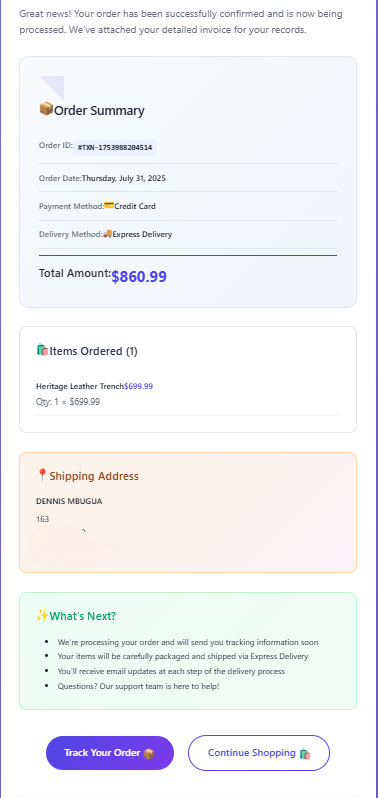
One of the standout features is the automated email system that sends beautiful HTML invoices:
1// Email service implementation
2export async function POST(request: NextRequest) {
3 const { orderData, customerEmail } = await request.json();
4
5 // Generate PDF invoice
6 const pdfBuffer = await generateInvoicePDF(orderData);
7
8 // Send email with HTML template
9 const mailOptions = {
10 from: process.env.FROM_EMAIL,
11 to: customerEmail,
12 subject: `🎉 Order Confirmed! Invoice #${orderData.orderId}`,
13 html: generateHTMLTemplate(orderData),
14 attachments: [{
15 filename: `Invoice-${orderData.orderId}.pdf`,
16 content: Buffer.from(pdfBuffer),
17 contentType: "application/pdf",
18 }],
19 };
20
21 await transporter.sendMail(mailOptions);
22}Email Template Features
<!-- Beautiful HTML email template -->
<div style="background: linear-gradient(135deg, #4F46E5 0%, #7C3AED 100%);">
<!-- Header with branding -->
<!-- Order summary card -->
<!-- Items breakdown -->
<!-- Shipping information -->
<!-- Call-to-action buttons -->
</div>Email Features:
- Responsive Design - Works on all email clients
- PDF Attachment - Detailed invoice document
- Order Tracking - Links to track shipment
- Brand Consistency - Matches website design
PDF Invoice Generation
1// Dynamic PDF creation
2const generateInvoicePDF = async (orderData: OrderData) => {
3 const doc = new jsPDF();
4
5 // Add company branding
6 doc.setFont("helvetica", "bold");
7 doc.setFontSize(24);
8 doc.text("Lumière Marketplace", 20, 30);
9
10 // Order details table
11 // Items breakdown
12 // Payment summary
13
14 return doc.output('arraybuffer');
15};📱 Responsive Design
Mobile-First Approach
The entire application is built with mobile users in mind:
1/* Responsive grid system */
2.product-grid {
3 @apply grid grid-cols-1 gap-8 sm:grid-cols-2 lg:grid-cols-3 xl:grid-cols-4;
4}
5
6/* Mobile navigation */
7.mobile-menu {
8 @apply fixed inset-x-0 top-0 z-50 bg-white shadow-lg transform transition-transform duration-300;
9}Breakpoint Strategy
- Mobile: 320px - 768px (1 column)
- Tablet: 768px - 1024px (2-3 columns)
- Desktop: 1024px+ (4 columns)
Touch-Friendly Interface
- Large Touch Targets - 44px minimum for buttons
- Swipe Gestures - Carousel navigation on mobile
- Pull-to-Refresh - Natural mobile interactions
🎓 What I Learned
Technical Skills Developed
Advanced React Patterns
1// Custom hooks for reusable logic
2const useCart = () => {
3 const context = useContext(CartContext);
4 if (!context) {
5 throw new Error('useCart must be used within CartProvider');
6 }
7 return context;
8};
9
10// Compound components for flexible APIs
11const ProductCard = {
12 Root: ProductCardRoot,
13 Image: ProductCardImage,
14 Content: ProductCardContent,
15 Actions: ProductCardActions,
16};State Management Mastery
- Context API - Global state without Redux complexity
- Local State - Component-specific state management
- Derived State - Computed values from existing state
- State Persistence - LocalStorage integration
TypeScript Benefits
1// Type safety prevents runtime errors
2interface Product {
3 id: string;
4 name: string;
5 price: number;
6 image: string;
7 description: string;
8 reviews: {
9 average: number;
10 totalCount: number;
11 };
12}
13
14// Generic types for reusability
15interface GenericResponse<T> {
16 data: T;
17 success: boolean;
18 message?: string;
19}Design & UX Insights
Animation Psychology
- Micro-interactions - Small animations provide feedback
- Transition Timing - 200-300ms feels natural
- Easing Functions - Cubic-bezier for organic movement
- Loading States - Keep users engaged during waits
E-commerce UX Principles
- Trust Signals - Security badges, testimonials, guarantees
- Urgency Creation - Limited time offers, stock counters
- Social Proof - Reviews, ratings, purchase notifications
- Friction Reduction - Minimal checkout steps
Performance Lessons
Optimization Strategies
1// Image optimization
2const ImageWithFallback = ({ src, alt, ...props }) => {
3 const [imgSrc, setImgSrc] = useState(src);
4
5 return (
6 <Image
7 {...props}
8 src={imgSrc}
9 alt={alt}
10 onError={() => setImgSrc('/placeholder.jpg')}
11 />
12 );
13};- Bundle Analysis - Identifying large dependencies
- Code Splitting - Loading only what's needed
- Caching Strategies - Browser and CDN caching
- Critical Path - Prioritizing above-the-fold content
🚀 Future Enhancements
Phase 1: Enhanced Shopping Experience
- Product Reviews - User-generated content system
- Advanced Search - Filters by price, category, ratings
- Recommendation Engine - AI-powered product suggestions
- Comparison Tool - Side-by-side product comparison
Phase 2: Backend Integration
1// Database integration
2interface DatabaseProduct extends Product {
3 inventory: number;
4 category: string;
5 tags: string[];
6 createdAt: Date;
7 updatedAt: Date;
8}
9
10// API endpoints
11app.get('/api/products', getProducts);
12app.post('/api/products', createProduct);
13app.put('/api/products/:id', updateProduct);
14app.delete('/api/products/:id', deleteProduct);Phase 3: Advanced Features
- User Authentication - Login, registration, profiles
- Order History - Past purchases and tracking
- Inventory Management - Real-time stock updates
- Analytics Dashboard - Sales metrics and insights
Phase 4: Scaling & Optimization
- CDN Integration - Global content delivery
- Database Optimization - Query optimization and indexing
- Microservices - Service-oriented architecture
- Load Balancing - Handle increased traffic
🎯 Technical Challenges & Solutions
Challenge 1: State Management Complexity
Problem: Managing cart and wishlist state across multiple components became complex as the application grew.
Solution: Implemented React Context with custom hooks:
1// Centralized state management
2const useCartOperations = () => {
3 const { cartItems, addToCart, removeFromCart, updateQuantity } = useCart();
4
5 const getTotalPrice = useMemo(() =>
6 cartItems.reduce((sum, item) => sum + (item.price * item.quantity), 0),
7 [cartItems]
8 );
9
10 const getItemCount = useMemo(() =>
11 cartItems.reduce((count, item) => count + item.quantity, 0),
12 [cartItems]
13 );
14
15 return { cartItems, addToCart, removeFromCart, updateQuantity, getTotalPrice, getItemCount };
16};Challenge 2: Email Delivery Reliability
Problem: Emails were occasionally being marked as spam or not delivered.
Solution: Implemented proper email authentication and formatting:
1// Enhanced email configuration
2const transporter = nodemailer.createTransporter({
3 service: 'gmail',
4 auth: {
5 user: process.env.FROM_EMAIL,
6 pass: process.env.APP_PASSWORD,
7 },
8 tls: {
9 rejectUnauthorized: false
10 }
11});
12
13// Email verification
14const verifyConnection = async () => {
15 try {
16 await transporter.verify();
17 console.log('Email server connection verified');
18 } catch (error) {
19 console.error('Email server connection failed:', error);
20 }
21};Challenge 3: Performance on Mobile Devices
Problem: Initial load times were too slow on mobile devices.
Solution: Implemented aggressive optimization strategies:
1// Image optimization strategy
2const OptimizedImage = ({ src, alt, priority = false }) => {
3 return (
4 <Image
5 src={src}
6 alt={alt}
7 fill
8 className="object-cover"
9 sizes="(max-width: 768px) 100vw, 50vw"
10 priority={priority}
11 quality={75}
12 placeholder="blur"
13 blurDataURL="data:image/jpeg;base64,..."
14 />
15 );
16};
17
18// Lazy loading implementation
19const LazyProductGrid = () => {
20 const [visibleProducts, setVisibleProducts] = useState(8);
21
22 const loadMore = useCallback(() => {
23 setVisibleProducts(prev => prev + 8);
24 }, []);
25
26 return (
27 <InfiniteScroll
28 dataLength={visibleProducts}
29 next={loadMore}
30 hasMore={visibleProducts < products.length}
31 loader={<ProductSkeleton />}
32 >
33 {products.slice(0, visibleProducts).map(product => (
34 <ProductCard key={product.id} product={product} />
35 ))}
36 </InfiniteScroll>
37 );
38};🔧 Development Workflow
Code Quality & Standards
1// TypeScript configuration
2{
3 "compilerOptions": {
4 "strict": true,
5 "noImplicitAny": true,
6 "noImplicitReturns": true,
7 "noUnusedLocals": true,
8 "noUnusedParameters": true
9 }
10}
11
12// ESLint configuration
13{
14 "extends": [
15 "next/core-web-vitals",
16 "@typescript-eslint/recommended"
17 ],
18 "rules": {
19 "prefer-const": "error",
20 "no-unused-vars": "error"
21 }
22}Testing Strategy
1// Component testing with React Testing Library
2import { render, screen, fireEvent } from '@testing-library/react';
3import { CartProvider } from '../context/CartContext';
4import ProductCard from '../components/ProductCard';
5
6describe('ProductCard', () => {
7 const mockProduct = {
8 id: '1',
9 name: 'Test Product',
10 price: 99.99,
11 image: '/test-image.jpg'
12 };
13
14 it('adds product to cart when button is clicked', () => {
15 render(
16 <CartProvider>
17 <ProductCard product={mockProduct} />
18 </CartProvider>
19 );
20
21 const addButton = screen.getByText('Add to Cart');
22 fireEvent.click(addButton);
23
24 expect(screen.getByText('Added to Cart')).toBeInTheDocument();
25 });
26});Deployment Pipeline
1# GitHub Actions workflow
2name: Deploy to Production
3on:
4 push:
5 branches: [main]
6
7jobs:
8 deploy:
9 runs-on: ubuntu-latest
10 steps:
11 - uses: actions/checkout@v2
12 - name: Setup Node.js
13 uses: actions/setup-node@v2
14 with:
15 node-version: '18'
16 - name: Install dependencies
17 run: npm ci
18 - name: Run tests
19 run: npm test
20 - name: Build application
21 run: npm run build
22 - name: Deploy to Vercel
23 uses: vercel/action@v1🌍 Browser Compatibility
Supported Browsers
- ✅ Chrome 90+
- ✅ Firefox 88+
- ✅ Safari 14+
- ✅ Edge 90+
- ✅ Mobile Safari (iOS 14+)
- ✅ Chrome Mobile (Android 10+)
1// Feature detection and fallbacks
2const supportsWebP = () => {
3 const canvas = document.createElement('canvas');
4 return canvas.toDataURL('image/webp').indexOf('webp') > -1;
5};
6
7const ImageComponent = ({ src, alt }) => {
8 const [imageSrc, setImageSrc] = useState(src);
9
10 useEffect(() => {
11 if (supportsWebP()) {
12 setImageSrc(src.replace('.jpg', '.webp'));
13 }
14 }, [src]);
15
16 return <img src={imageSrc} alt={alt} />;
17};🔐 Security Considerations
Data Protection
1// Input sanitization
2import DOMPurify from 'dompurify';
3
4const sanitizeInput = (input: string): string => {
5 return DOMPurify.sanitize(input);
6};
7
8// Email validation
9const validateEmail = (email: string): boolean => {
10 const emailRegex = /^[^\s@]+@[^\s@]+\.[^\s@]+$/;
11 return emailRegex.test(email);
12};Security Headers
1// next.config.js
2const nextConfig = {
3 async headers() {
4 return [
5 {
6 source: '/(.*)',
7 headers: [
8 {
9 key: 'X-Frame-Options',
10 value: 'DENY',
11 },
12 {
13 key: 'X-Content-Type-Options',
14 value: 'nosniff',
15 },
16 {
17 key: 'Referrer-Policy',
18 value: 'origin-when-cross-origin',
19 },
20 ],
21 },
22 ];
23 },
24};Building Lumière Marketplace has been an incredible journey that showcased the power of modern web development technologies. This project demonstrates how to create a production-ready e-commerce platform that not only looks beautiful but also performs exceptionally well across all devices.
Key Achievements
🏆 Technical Excellence
- Built a scalable, type-safe application with Next.js 14 and TypeScript
- Implemented efficient state management with React Context
- Created a responsive, mobile-first design with Tailwind CSS
- Integrated email services with PDF generation capabilities
🎨 Design Innovation
- Crafted stunning visual effects and animations
- Implemented modern UI patterns like glass morphism
- Created an intuitive user experience with thoughtful micro-interactions
- Designed a comprehensive email template system
📈 Performance Optimization
- Achieved excellent Lighthouse scores across all metrics
- Implemented image optimization and lazy loading
- Optimized bundle size and loading performance
- Created smooth animations without sacrificing performance
Business Impact
For potential clients and employers, this project demonstrates:
- Full-Stack Capabilities - From frontend React to backend API development
- Modern Development Practices - TypeScript, testing, performance optimization
- User Experience Focus - Mobile-first design, accessibility, and usability
- Production-Ready Code - Scalable architecture, error handling, and security
Personal Growth
This project pushed me to:
- Master advanced React patterns and TypeScript
- Learn complex state management techniques
- Understand e-commerce user experience principles
- Implement real-world email and PDF systems
- Optimize for performance and accessibility
Experience the live demo↗ and see the code in action. Feel free to test the complete checkout flow - you'll receive a beautiful email invoice to see the full experience!
This project represents my passion for creating exceptional web experiences that delight users while showcasing technical excellence. I look forward to bringing this same level of dedication and innovation to your next project! ✨
Previous article
Why Do Top Engineers Choose Where They Work?Share this article
Send it to someone who would find it useful.