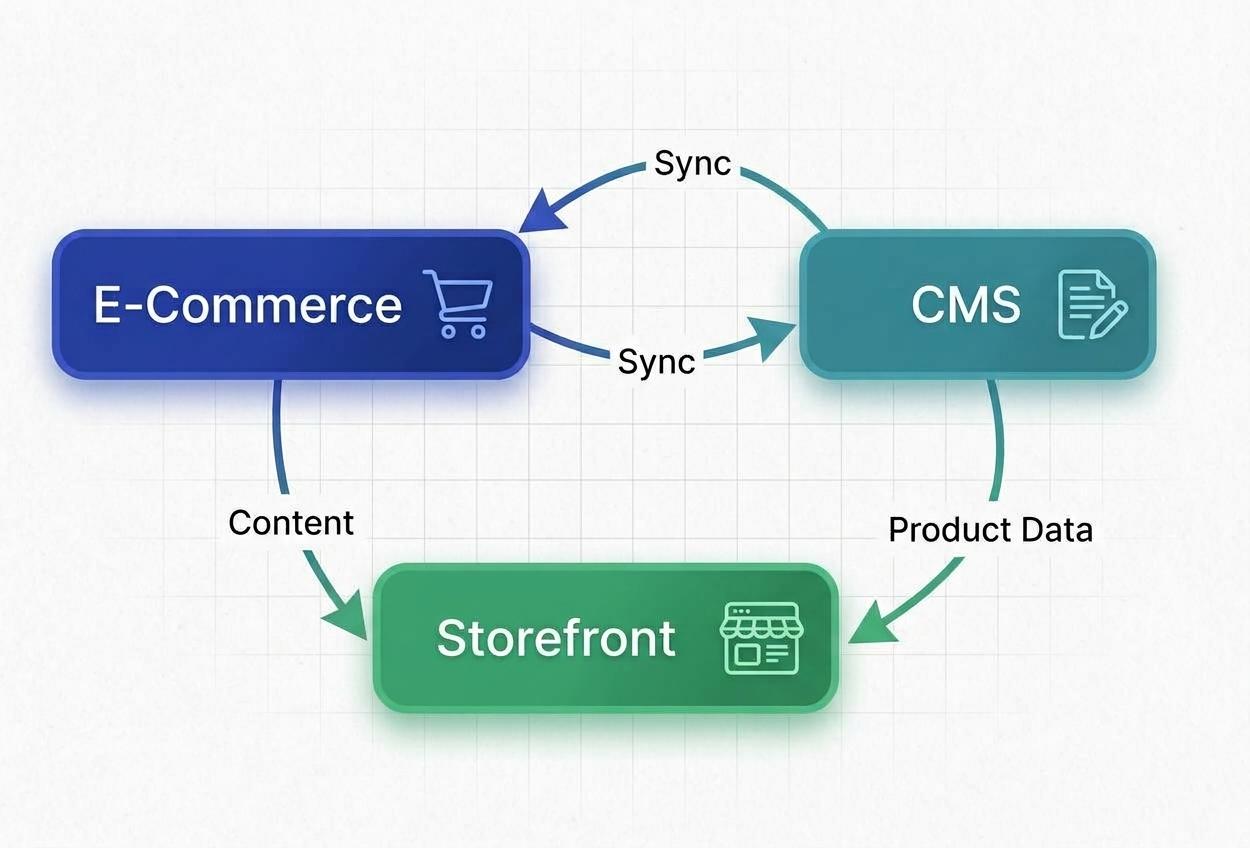
An online store has two experiences to get right.
- Customers need to find products and understand what they are considering, and
- The business needs a practical way to maintain the information those customers see.
These experiences are connected, but they both serve different purposes. The storefront presents information. The content-management workflow allows the business to keep that information useful and up to date.
When building an e-commerce experience for a client, I treated these as two parts of the same problem rather than focusing exclusively on the website customers would see.
I used Sanity as a headless content management system (CMS), separated product content management from storefront presentation, organized product information, and implemented a preview experience that allows administrators to see their content on the actual website in real time.
The central design decision was to make product information manageable independent of the code responsible for presenting it.
The problem was bigger than displaying products.
A product catalogue is not static content. Product details and descriptions change, as someone needs to maintain them. That creates two connected responsibilities.
- The storefront must present product information clearly enough for customers to evaluate their options, and
- The content-management interface must be practical enough for the business to maintain that information without making unnecessary routine updates.
These responsibilities can become entangled when the process for changing content is too closely tied to the process for changing the website.
The original project requirements established the need to support both shoppers and the people managing product information. They did not document a specific pre-existing failure, such as excessive update times or lost sales. I therefore approached the work as a design problem: how could the implementation support both experiences without treating them as the same job?
What I noticed: editing content and presenting content are different jobs
An administrator working in a CMS sees fields and structured information while a customer sees a product listing or product page. Those are different views of the same content. The content must be organized appropriately in ways that support administration, while the storefront must display it in ways that make sense to shoppers.
I wanted the implementation to preserve that distinction. For example, the way a product description is stored and maintained doesn’t have to exactly determine how the description is arranged on the page. The storefront can control its presentation while the CMS remains responsible for the underlying content.
This creates a clearer division of responsibility. It also makes a connected preview valuable: administrators can review content in its customer-facing context rather than judging the final experience entirely from the editing fields.
The decision: separate product management from storefront presentation
I used Sanity as the headless CMS for product information.
In this architecture, Sanity provides the content-management environment, while the storefront retrieves that content and controls how it appears to customers.
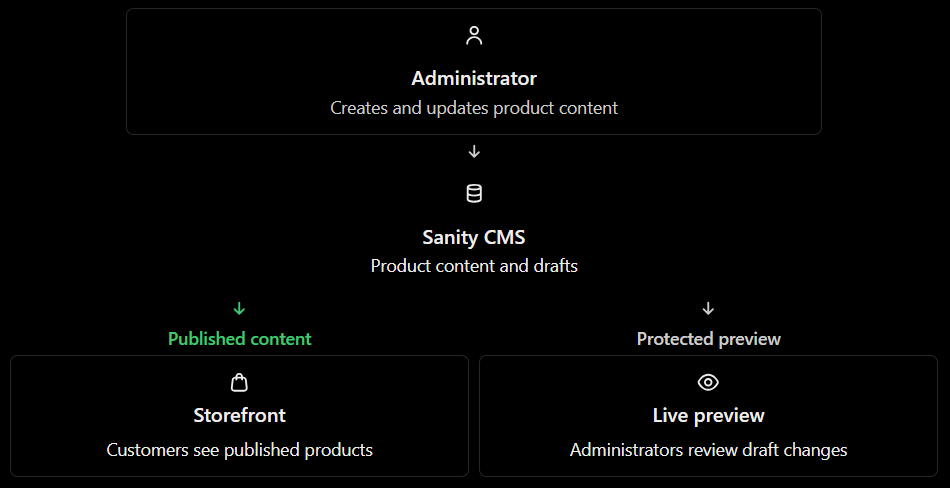
This approach allows product information changes to be managed separately from changes to the storefront's presentation code.
It does not eliminate frontend development or integration work. Instead, it separates responsibilities so that ordinary content updates and changes to the customer-facing interface do not have to be treated as the same task. That distinction was the important part of the implementation.
A headless CMS is not automatically the best architecture for every online store. An integrated commerce platform may already provide suitable product management, preview, and publishing workflows with less maintenance overhead. The decision depends on whether separating those responsibilities addresses a real requirement. In this project, I implemented that separation as part of the intended content-management and storefront experience.
What changed in the implementation
In this walkthrough, you can see how product information is managed in Sanity, how it appears on the customer-facing website, and how administrators can preview the experience in context.
See the e-commerce experience in action → https://www.youtube.com/watch?v=gzWMBNlVIuY↗
1. Product information was organized for the storefront
I organized the products and improved the presentation of information on the customer-facing website. The purpose was to make the available products and their information easier to browse and understand.
Product presentation matters because customers use the information shown in listings and on product pages to decide which products deserve closer attention. Baymard Institute's research on product-listing information↗ examines how missing or poorly selected product attributes can interfere with that process. That research supports the general importance of product information.
2. Product content could be managed separately
Administrators manage product information in Sanity while the storefront controls its presentation. Routine content changes therefore do not inherently require changes to the website's presentation code.
For the business, this provides a more direct content-management workflow. It can also reduce unnecessary developer involvement when the change concerns content rather than application behavior. The actual operational improvement depends on how the team worked before and how frequently it updates the catalogue.
3. Administrators could preview the customer-facing result
I implemented a real-time preview experience so administrators could review how their content would appear on the actual website. This closes an important gap between editing information and reviewing its presentation.
An administrator might enter a perfectly reasonable description into a field, but its final appearance also depends on the layout and other elements surrounding it. Seeing the content in context provides a more useful way to review the result.
Sanity's visual-editing documentation↗ describes how connected previews can bridge the editing environment and the website. A production implementation should also distinguish draft content from published content and protect access to unpublished previews. Previewing is a review capability, not permission to expose unfinished content to public shoppers.
What this means for the business
The implementation supports three practical capabilities:
- a more organized product presentation,
- a dedicated content-management workflow, and
- a way to inspect content in context.
Each addresses a different part of the experience. The storefront addresses how customers receive product information, and the CMS addresses how the business maintains it. The preview connects the two.
Together, these capabilities intend to make product presentation and ongoing content maintenance easier to manage.
When would I choose a different approach?
The separation comes with a trade-off: the CMS and storefront need to be integrated and maintained.
If the business has a small catalogue, infrequent updates, and straightforward presentation needs, a conventional commerce platform may already adequately solve the problem.
A separate CMS becomes more compelling when the content workflow or frontend requirements justify the added integration responsibilities.
It’s therefore important to examine the current workflow before recommending a platform change. If the real difficulty is inconsistent product information, improving the content structure and validation rules may be more valuable than replacing the storefront. If administrators cannot assess how content will appear, a reliable preview workflow may be the more direct intervention. If customers cannot distinguish relevant products, better product attributes, categories, search, or filtering may deserve attention before an architectural redesign. Different problems require different interventions.
The engineering lesson
Building an e-commerce website involves more than creating the interface customers interact with. It also involves considering the processes that keep that interface useful after launch.
In this project, I connected product content management and storefront presentation through Sanity, organized the products, improved how their information appeared, and enabled administrators to preview their changes in context.
The broader lesson is that software should be designed around both the experience it delivers and the work the business must perform to maintain that experience.
The right architecture is the one that serves those needs without introducing unnecessary complexity.
If your software is becoming harder to manage as your business grows, start by identifying where the friction occurs before a major rebuild.
Share this article
Send it to someone who would find it useful.