If you run a small business, or support one, you already know the uncomfortable truth about invoicing: The invoice itself is not usually the hard part.
The waiting is.
Waiting to confirm totals.
Waiting to fix mistakes.
Waiting to find the invoice that a customer is asking about.
Waiting to get paid because the invoice went out late, came through unclear, or needed to be corrected.
That waiting is not harmless.
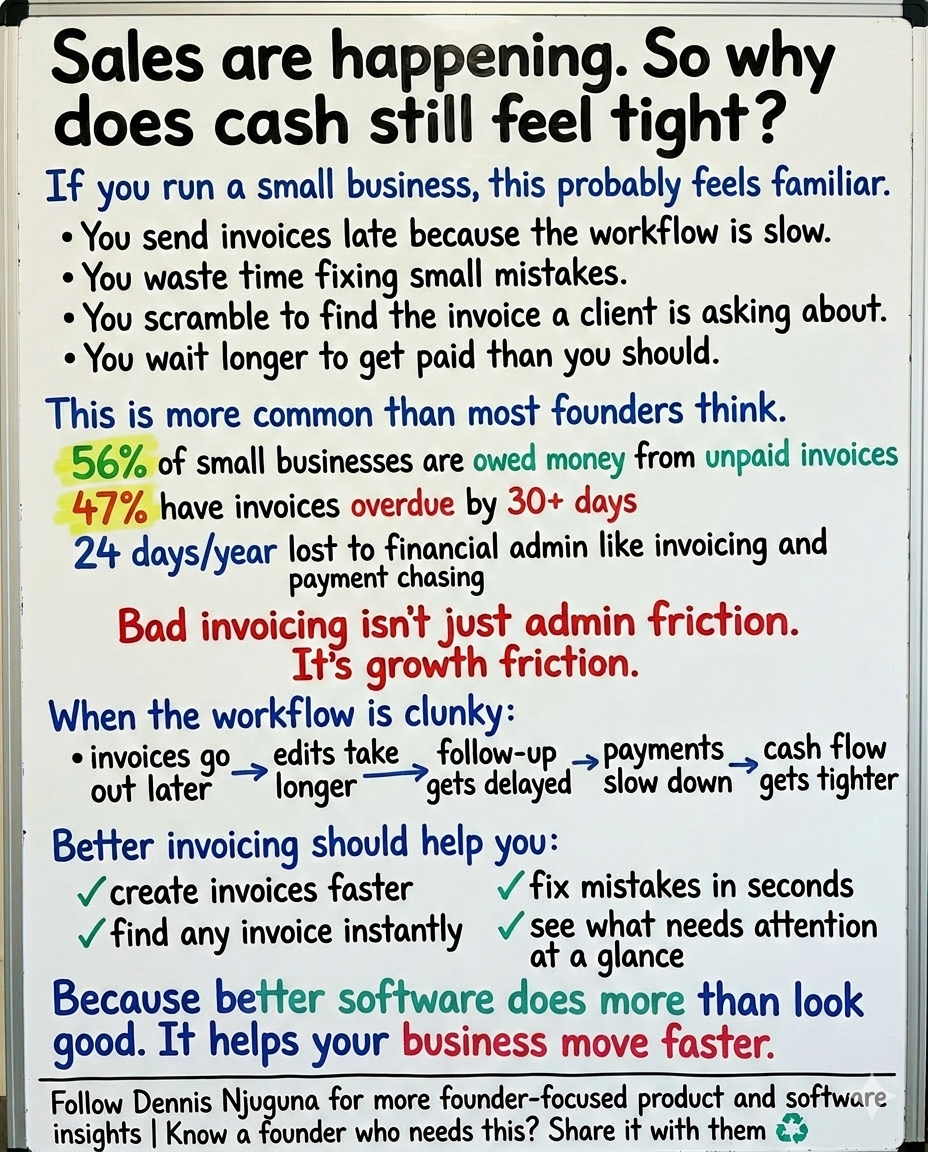
In Intuit QuickBooks’ 2025 U.S. late-payments report, 56% of small businesses said they were owed money from unpaid invoices, averaging $17,500 per business. Nearly 47% said some of their invoices were overdue by more than 30 days.
In the UK, Intuit QuickBooks reported in 2025 that 62% of small businesses were owed money from unpaid invoices, averaging £21.4K, and a March 2026 QuickBooks UK survey said 61% had invoices more than 30 days overdue. Sage’s 2025 research adds another layer: SMBs lose 24 days a year to financial admin, including invoicing, chasing payments, and correcting errors.
That is why I do not see invoicing as a boring back-office problem.
I see it as a growth problem.
Because once invoicing gets messy, the business does too.
Cash becomes less predictable.
Collections become more reactive.
People spend more time chasing than shipping.
And work that should feel routine starts creating drag all across the company.
This is exactly why small business invoicing software should do more than generate PDFs and store records. It should reduce friction at the exact moments where payment gets delayed: when invoices are created, edited, searched, prioritized, and followed up.
That is the thinking behind React Invoices.
It is not “just an invoicing UI.” It is a practical demonstration of how enterprise-grade UX patterns, such as modal flows, real-time search, inline editing, color-coded prioritization, and predictable state updates can make invoicing faster, clearer, and easier to act on.
The real problem: traditional invoicing workflows create avoidable delay
Most teams do not set out to create slow invoicing workflows.
They inherit them.
A multi-step form here.
A buried search bar there.
A fragile edit flow that makes people nervous to touch anything.
A status view that treats overdue invoices and next-week invoices as if they are equally urgent.
Individually, those issues look small.
Together, they create a predictable chain reaction:
- invoice creation takes longer than it should
- finding the right invoice takes too long
- simple mistakes become annoying to fix
- overdue items are harder to spot
- back-and-forth with customers increases
- payment gets pushed out again
And this is not theoretical.
UK government research published in 2024 found that the mean percentage of payments that were late was 17%, with variation by sector. QuickBooks’ February 2026 Small Business Insights also reported that 56% of respondents wait more than 30 days for invoices to be paid.
That is the part founders and operators should pay attention to: a bad invoicing workflow does not just waste time. It quietly stretches time-to-cash.
What React Invoices is designed to solve
React Invoices focuses on the part you can control.
You cannot control every client’s behavior.
You cannot force every customer to pay instantly.
But you can absolutely improve the speed, clarity, and correctness of the invoicing workflow inside your product or your internal tools.
The product philosophy is simple: Keep users in flow. Reduce cognitive load. Make every action feel immediate.
That sounds like a design slogan until you realize how often invoicing is made harder by avoidable interface friction.
Nielsen Norman Group has long noted that around 0.1 seconds feels instantaneous to users, while 1 second is about the upper bound for preserving flow without interruption. They also point out that cognitive load, the mental effort required to use an interface, directly affects how easily users complete tasks. That matters a lot in invoicing, where people are repeatedly searching, checking, editing, and confirming under time pressure.
In other words, if invoicing software feels slow, cluttered, or mentally heavy, it is not just annoying. It is operationally expensive.
The UX decisions that make this invoicing workflow work
1) Modal-based invoice creation keeps the user in context
Creating an invoice should feel like a focused action, not a detour.
That is why React Invoices uses a modal-based creation flow. You open the modal, create the invoice, save it, and stay anchored in the list you were already working from.
That matters more than it sounds.
Context-switching is one of the quiet killers of admin workflows. If users have to jump to a separate page, lose visual reference to the existing list, and then navigate back, the task starts feeling heavier than it should.
Nielsen Norman Group’s guidance on dialogs is useful here: modal dialogs are best used intentionally, when the interface needs to direct the user’s attention toward a focused task. Invoice creation fits that pattern well.
For the user, the benefit is simple: create an invoice quickly, then immediately see it reflected in the workflow.
2) Real-time search turns “find invoice” into a two-second task
Search is one of those features almost every invoicing app has.
But a lot of them still make it feel slow.
You type, press enter, wait, paginate, backtrack, and mentally re-orient. That is not a search. That is friction with a search box attached.
React Invoices uses a unified, real-time search state so the invoice list filters as you type. No submit button. No page refresh. No hunting around.
That design choice is not just about convenience. It is about preserving flow.
When a customer asks about invoice #2847 or wants a correction on the Acme account, retrieval speed matters. The faster you can find the invoice, the faster you can fix the issue, answer the question, and move the payment process forward. NN/g’s response-time guidance is exactly why sub-second feedback feels so much better in these moments.
3) Inline editing makes errors fixable before they become payment delays
Most invoicing mistakes are not dramatic.
A wrong quantity.
An outdated due date.
A line item that needs adjusting.
A customer detail that was entered incorrectly.
The problem is not that mistakes happen. The problem is that many systems make them annoying to fix.
That delay matters because people procrastinate on annoying fixes. And when invoice corrections get deferred, payment gets deferred too.
React Invoices uses inline editing so users can update customer info, dates, line items, quantities, and prices directly in place. That makes the system feel forgiving, which is exactly what a business workflow should be.
NN/g’s more recent guidance on form design emphasizes reducing cognitive load through structure, clarity, transparency, and support. That fits invoicing perfectly. Editing should feel obvious, controlled, and low-risk, not like you are reopening an entire process just to change one number. (Nielsen Norman Group)
There is also a practical engineering detail here: input values arrive as strings, so safe numeric normalization matters. That protects totals from bad math, string-concatenation bugs, and inconsistent rendering. Small implementation details like that are what separate a demo that looks good from a product that holds up under real use.
4) Due-date color cues reduce thinking, not just clicks
One of the biggest problems in invoice management is prioritization.
Not everything needs action right now.
But some things clearly do.
If the UI forces users to read every date, compare each invoice manually, and mentally calculate urgency, the software is offloading work onto the human.
That is bad product design.
React Invoices uses visual due-date cues so users can see, at a glance, what is healthy, what is approaching, and what is overdue. That reduces mental effort and helps teams triage faster.
This matters because late payments are not evenly distributed, and small businesses feel the impact sharply. The UK government’s 2024 research found that late payments remain a measurable issue across sectors, while QuickBooks’ 2025 and 2026 data keep showing that overdue invoices are common and tied to broader business stress.
When urgency is visible, follow-up gets easier.
5) One-click paid/unpaid updates keep the system trustworthy
Status maintenance sounds small until the data stops matching reality.
Then everything downstream gets worse.
Collections reporting becomes noisy.
Follow-up gets inconsistent.
People stop trusting the dashboard.
And the team starts keeping “backup truth” in Slack, spreadsheets, or memory.
That is why the paid/unpaid toggle matters.
A single click keeps invoice status current without turning routine maintenance into a chore. In any invoicing workflow, low-friction status updates are what keep the system usable over time.
And once the system stays accurate, it becomes much easier to prioritize work, spot risk, and follow through consistently.
Why better invoicing UX translates into cash flow
This is the business case, and it is stronger than many teams realize.
QuickBooks’ 2025 U.S. report found that businesses more affected by late payments were more likely to report cash flow problems, greater reliance on credit cards, and difficulty hiring skilled workers. Businesses with longer payment terms were also more likely to report cash flow issues than those asking for immediate payment. In the UK, QuickBooks found a similar pattern: businesses with more invoices overdue by 30+ days were more likely to report cash flow problems, credit strain, and hiring challenges.
That is the key point: Late payments are not isolated. They spill.
They spill into:
➜ hiring.
➜ financing.
➜ pricing.
➜ confidence.
➜ how aggressively the business can move.
So when someone says, “It’s just invoicing,” I disagree.
A faster invoicing workflow helps you:
- send invoices sooner
- correct mistakes faster
- retrieve invoices instantly
- prioritize collections more clearly
- reduce avoidable delays before they become receivables problems
That is not cosmetic UX work. That is infrastructure for getting paid.
Who this is for
React Invoices is especially useful as a case study or foundation for four groups:
1) Freelancers and small businesses
They need lightweight invoicing software that is fast, clear, and customizable without the weight of a bloated accounting suite.
2) Ops and finance teams
They need invoice management that makes status obvious, corrections easy, and collections follow-up more consistent.
3) Startups prototyping invoicing features
They need a UI-first way to validate an invoicing workflow before committing to deeper backend or ERP complexity.
4) React developers and product teams
They need a real example of production-minded patterns — Context API, modal workflows, inline editing, immutable updates, shared state, and UI responsiveness applied to a business problem that actually matters.
The architecture choice matters too
Under the hood, React Invoices uses a clean pattern that is easy to reason about: global state for shared invoice data, local state for focused UI interactions
That split matters.
It keeps the data model predictable.
It makes list updates reliable.
And it reduces the kinds of ghost bugs that show up when the state gets mutated directly.
Immutable updates are especially important here because React relies on reference changes to know when to re-render. If invoice edits, toggles, and list filters are handled predictably, the interface stays trustworthy.
That is one of the bigger themes behind this project:
The UX feels better when the state model is cleaner.
Good frontend architecture is not separate from good business UX. In invoicing software, they reinforce each other.
What a production-ready version would add
React Invoices is intentionally UI-first.
That makes it useful for learning, demos, and prototyping. But in a production rollout, most teams would extend it with:
- persistence through a REST or GraphQL backend
- PDF generation and print-friendly invoice output
- email sending and delivery logs
- payment links through Stripe or PayPal
- webhook-driven paid status updates
- reminders for upcoming and overdue invoices
- audit trails for who edited what and when
- role-based permissions for finance, ops, and leadership views
Those are not random roadmap extras.
Each one removes another layer of friction.
PDFs improve compatibility.
Payments shorten time-to-cash.
Reminders reduce manual chasing.
Audit logs build trust.
Permissions support scale.
That is how good products evolve: not by adding features for the sake of it, but by removing the next obvious bottleneck.
Final takeaway
The best small business invoicing software does not just help you create invoices.
It helps you get paid with less friction.
That is the standard more founders should demand.
Because the real cost of a bad invoicing workflow is not just admin time. It is delayed cash, slower decisions, more reactive operations, and a business that feels harder to run than it should.
React Invoices is a practical example of a better approach:
- faster creation,
- faster search,
- faster edits,
- clearer prioritization,
- more predictable state,
- less avoidable delay.
If you are building software for founders, finance teams, or service businesses, that is the kind of workflow thinking worth taking seriously.
And if your product or internal tools are still creating drag around invoicing, collections, or finance operations, that is usually a design and systems problem before it becomes a cash-flow problem.
That is the work I do.
I help founders build scalable, production-grade software that supports growth.
If you want to turn a messy workflow into a product that moves faster, reads clearer, and holds up under real business pressure, book a discovery call.↗
If this article made you rethink how invoicing affects cash flow, share it with a founder, operator, or product lead who needs to see it.
And if you want more practical breakdowns on software, systems, and growth, subscribe for future posts.↗
Share this article
Send it to someone who would find it useful.