
You can do almost everything right and still lose customers because your website feels slow.
That is what makes this problem expensive.
You invest in positioning.
You refine the offer.
You work on SEO.
You pay for traffic.
You tighten your landing pages.
And then a visitor clicks through, waits a beat too long, gets hit with a heavy page, janky layout shifts, or a delayed interaction… and leaves.
Not because your business is weak.
Because the experience made the wrong impression.
That is why website speed optimization is not just a technical cleanup project anymore. It is a conversion lever. It is a trust lever. And, increasingly, it is an SEO lever too.
The business impact is not subtle. Portent’s research found that a site loading in 1 second had roughly 3x higher goal conversion rates than a site loading in 5 seconds, and 5x higher goal conversion rates than one loading in 10 seconds. On the e-commerce side, its data showed a 1-second site converting about 2.5x higher than a 5-second site. Separately, Deloitte’s “Milliseconds Make Millions” study found that a 0.1-second mobile speed improvement was associated with an 8.4% increase in retail conversions and a 10.1% increase in travel conversions.
That matters even more when you remember how tight most conversion economics already are. Unbounce’s Q4 2024 benchmark, based on 464 million visits across 41,000 landing pages, put the median landing page conversion rate at 6.6% across industries. When the baseline is that competitive, performance improvements do not have to be dramatic to move revenue.
Why is this problem getting worse, not better?
A lot of founders assume websites are naturally getting faster because tooling is better.
In practice, many websites are getting heavier.
According to the HTTP Archive’s 2024 Web Almanac, the median mobile page weighed 2,311 KB in October 2024, while the median desktop page weighed 2,652 KB. Over the last 10 years, median mobile page weight has grown 357%. The same report shows the median mobile page now makes 22 JavaScript requests, and the median mobile homepage ships about 558 KB of JavaScript.
That is the trap.
Teams add one more analytics tag.
One more widget.
One more UI library.
One more “temporary” script.
One more framework abstraction.
Nothing looks catastrophic in isolation.
But the user does not experience your decisions one at a time. They experience the page as a whole.
So if your site feels slower than it did a year ago, that feeling is probably not imaginary. The modern web is still shipping a lot of weight, and JavaScript is a big part of the story. HTTP Archive notes that in 2024, JavaScript overtook images as the dominant file type by request count, with the median page requesting 24 JS files on desktop and 22 on mobile.
What Google actually measures now
This is also where many teams oversimplify SEO.
Google does not rank pages based on “speed” as a single magic number. Its guidance is more nuanced than that. Google says its core ranking systems look to reward content that provides a good page experience, and that Core Web Vitals are used by its ranking systems but it also says there is no single page experience signal and that strong Core Web Vitals alone do not guarantee top rankings.
The current Core Web Vitals thresholds Google points site owners to are straightforward:
- LCP under 2.5 seconds
- INP under 200 milliseconds
- CLS under 0.1
And yes, there was an important change here: INP replaced FID in March 2024 as Google’s responsiveness metric. That means teams should care less about whether a page starts responding quickly and more about whether it remains responsive throughout the session.
There is another important operational point that gets missed: Google Search Console’s Core Web Vitals report is based on real-world field data from actual users, not just lab simulations. It groups pages by performance status and uses real user data for LCP, INP, and CLS.
That is why a homepage can look “fine” in a dev environment and still underperform in the real world.
Your users are not browsing on your laptop.
They are browsing on weaker devices, worse networks, and noisier sessions.
What slow websites usually reveal
When I look at a slow site, the issue is rarely just “images are too big.”
Usually, a slow website is exposing one of five deeper problems:
1. The site is shipping too much JavaScript
This is one of the most common issues on modern marketing sites. If a mostly content-driven site behaves like a mini web app, you are often paying a JavaScript tax you do not need to pay.
2. Third-party tools are running the page
Chat widgets, tag managers, analytics tools, A/B testing platforms, embedded schedulers, heatmaps, and ad scripts all have a cost. Teams add them because each one feels justified. The browser does not care about your justification. It still has to execute them.
3. The rendering strategy was never chosen intentionally
Some pages should be static. Some should be server-rendered. Some should hydrate selectively. Some should stay client-side. Problems start when every page gets treated the same.
4. The website architecture no longer matches the business
This is where performance stops being a tuning issue and becomes an architecture issue. A content-heavy website built with app-level complexity will keep fighting you.
5. Nobody set a performance budget
If there is no ceiling for JavaScript, image weight, third-party scripts, or interaction latency, the site will grow until performance becomes a quarterly emergency.
A practical website speed optimization plan
If your website feels heavy, do not start by arguing about tools. Start by diagnosing where the drag actually comes from.
Step 1: Measure real-world performance first
Check Google Search Console for field data and PageSpeed Insights for page-level diagnostics. Search Console tells you how real users experience groups of pages; PageSpeed Insights helps you inspect specific URLs. Google’s own documentation recommends using these tools together.
Step 2: Fix the highest-leverage issues before the clever ones
In most cases, the first wins come from:
- reducing image weight and dimensions
- deferring or removing nonessential third-party scripts
- cutting shipped JavaScript
- improving caching and CDN behavior
- reducing render-blocking resources
- loading fewer fonts and variants
This is not glamorous work. It is profitable work.
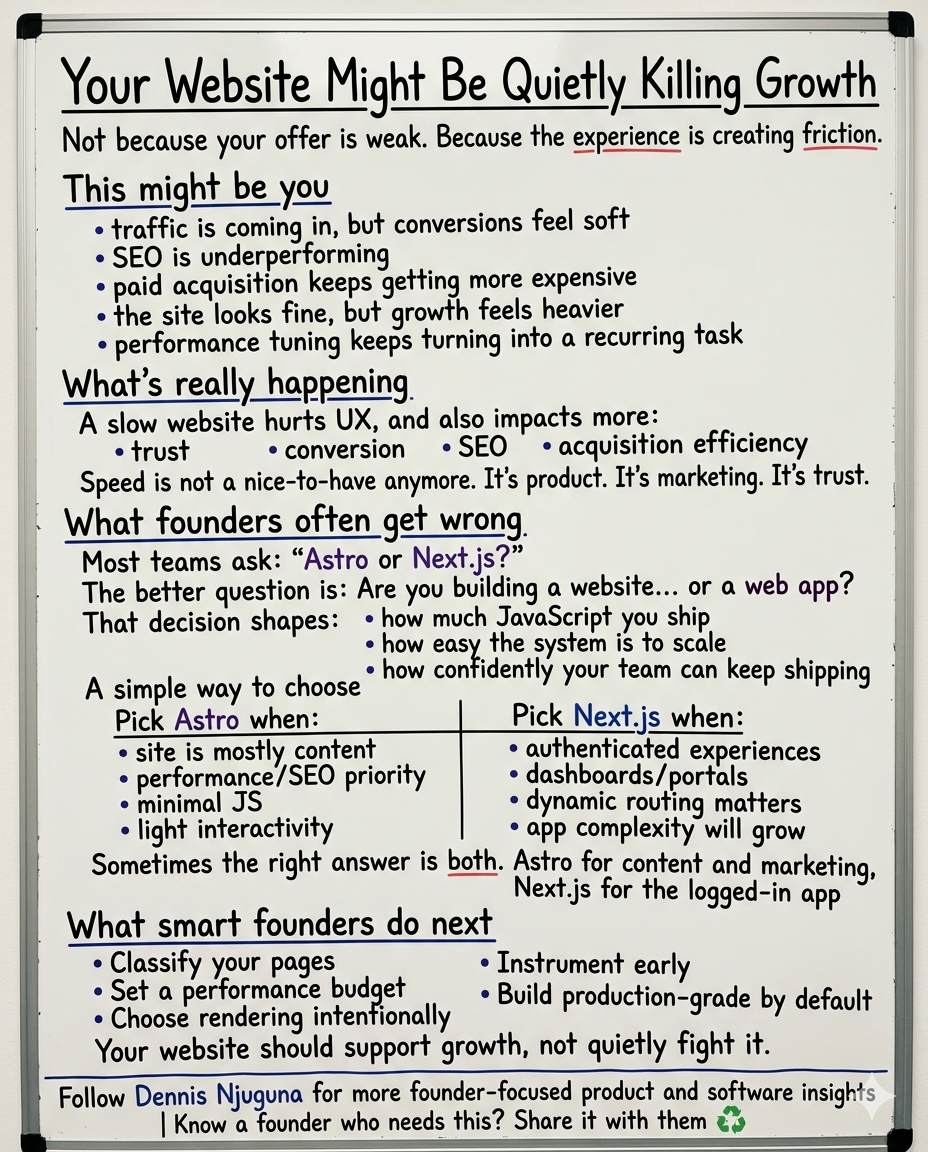
Step 3: Separate marketing pages from application pages
This is a big one.
Your homepage, service pages, docs, blog, and landing pages usually do not need the same rendering model as authenticated dashboards, portals, or complex product flows.
Treating every page like an app is how content sites get bloated.
Step 4: Set explicit performance budgets
Define what “fast enough” means before the next feature gets added.
For example:
- target LCP under 2.5s
- target INP under 200ms
- set a JavaScript budget per page type
- cap third-party tools
- define acceptable image weight on key templates
Once you set budgets, performance stops being a matter of opinion.
Step 5: Revisit the stack if the pattern keeps repeating
Sometimes teams try to solve an architecture problem with optimization plugins.
That usually works for a little while.
Then the regressions come back.
If your marketing site is content-heavy, SEO-sensitive, and mostly static, you may need a lighter public-facing architecture. If your logged-in product is complex, dynamic, and authenticated, you may need a different setup there. The point is not to chase whatever framework is fashionable. The point is to match the technical foundation to the job.
That is the difference between a site that gets faster once and a site that stays fast as the business grows.
The founder-level takeaway
You should not have to keep buying traffic just to outrun website friction.
That is the hidden tax of poor performance.
It raises your acquisition costs.
It weakens trust at the moment of first impression.
It makes SEO harder than it needs to be.
And it turns what should be a compounding asset into a leaky one.
Website speed optimization is not about squeezing out a prettier Lighthouse screenshot.
It is about removing friction from growth.
If your website is content-heavy, performance-sensitive, or starting to feel harder to scale than it should, that is usually a signal worth taking seriously.
Share this article
Send it to someone who would find it useful.